Clone Tool : It is used to duplicate the sample area .It copies the frame you select and reproduces it wherever you want.
Heal Tool : It is very similar to the clone tool but it doesn't copy the colours of the image, it also copies the texture, lightening, transparency... It is very usefull to correct imperfections in the face like wrinkle, zit...
Friday, 29 January 2016
Hello
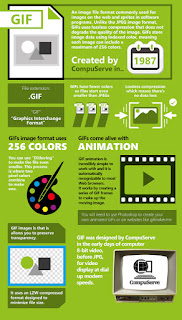
Today I'm going to talk about what I have learned this week. We have done a lot of interesting things, one of them is the image formats. There are a lot of types but I'm only going to explain one of them.
GIFF: Is an image file format commonly used for images. It only has 256 colours.
Hello,
Today I'm going to explain what I have done these days in class. We have to decorate the high school. For doing that we use gimp. First, we have to do two drawings and then putted at the background. Hope you like it!
Sunday, 10 January 2016
Hello, Today I'm going to talk about Javier Fernandez. He is a Spanish figure saketer. He was born on 15 April 1991. He is one of the few ice skaters performing quadruple jumps. Due to its successes it is considered the best Spanish skater.
Hello,
In this post I'm going to talk about my last project. It was about taking a photograph and make snow at he background. I can do this thanks to gimp.
I wish you to have a merry christmas and a happy new year.